Implementing MCP Servers for Internal Tools: A Practical Developer Guide
Learn how to design and implement an MCP server that safely connects AI applications to internal APIs, databases, services, and enterprise workflows.
Giving an AI assistant access to company systems sounds simple:
LLM → Internal API → Result
In practice, it quickly becomes messy.
One application needs access to customer records. Another needs Jira-style project data. A developer assistant needs deployment information. An operations agent needs monitoring tools.
Before long, every AI application has its own integrations:
AI Assistant ───────→ CRM API
Developer Agent ────→ Deployment API
Support Agent ──────→ Ticket System
Analytics Agent ────→ Internal Database
Each integration requires its own schemas, authentication logic, error handling, permissions, and documentation.
Model Context Protocol (MCP) gives us another approach.
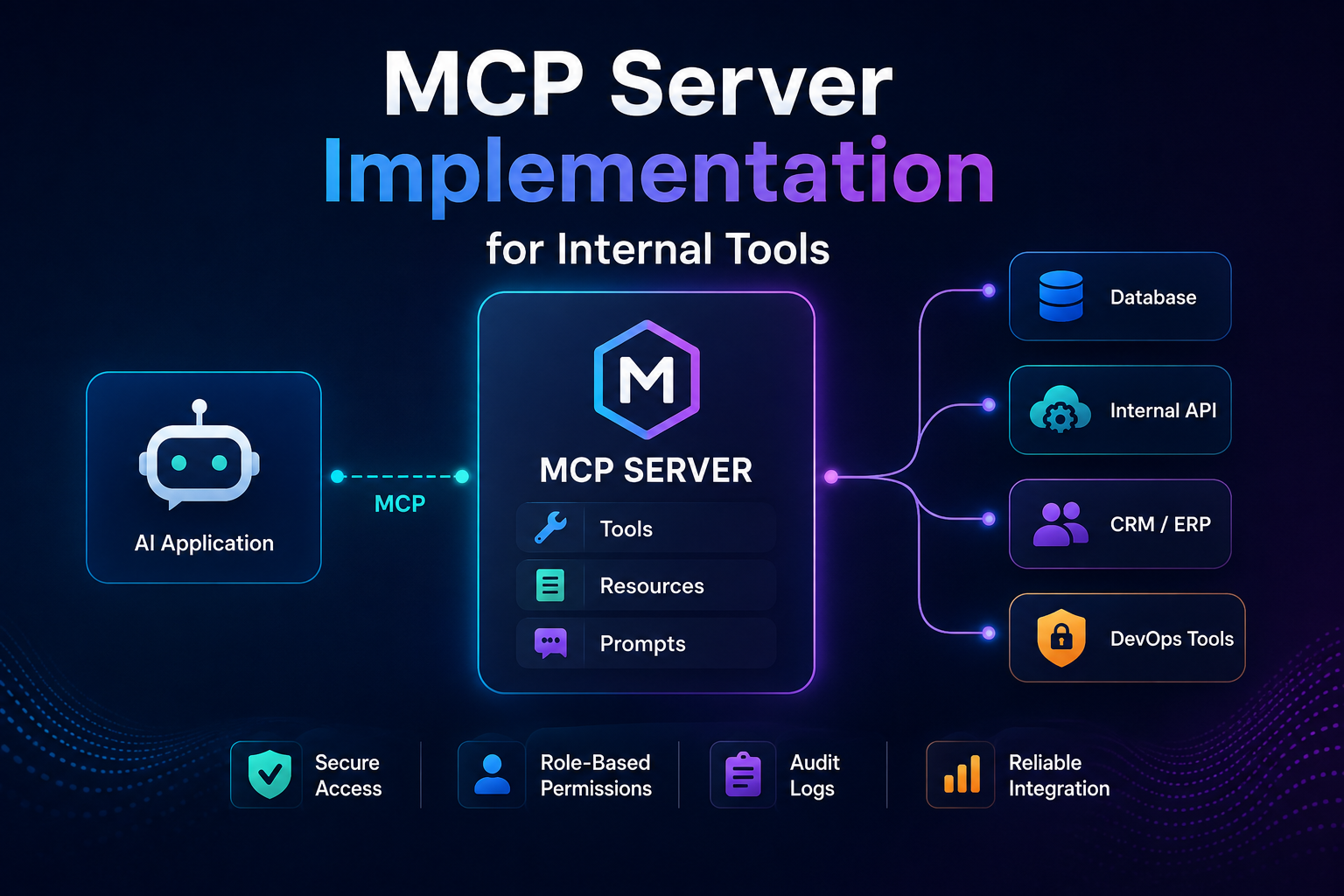
Instead of teaching every AI application how every internal system works, we can put an MCP server between them.
AI Application
       │
       │ MCP
       ▼
+------------------+
|    MCP Server    |
+------------------+
   │      │      │
   ▼      ▼      ▼
 CRM     DB     Internal API
The server exposes carefully controlled capabilities that an MCP-compatible application can discover and use.
In this tutorial, we'll walk through MCP server implementation for internal tools, starting with architecture and ending with security, testing, and production deployment.
What Is an MCP Server?
Model Context Protocol is an open protocol for connecting AI applications with external systems and context.
An MCP server sits on the system side of that relationship.
Instead of exposing an entire internal application directly to an AI model, the server exposes specific MCP capabilities.
The three primitives you'll encounter most often are:
Tools
Tools allow the AI application to perform actions or calculations.
Examples:
get_customer
search_tickets
create_support_ticket
check_deployment
restart_service
generate_report
Resources
Resources expose information that can be read as context.
Examples:
internal documentation
configuration
database-backed records
service information
project metadata
runbooks
Prompts
Prompts expose reusable interaction templates.
For example:
summarize_incident
review_deployment
prepare_customer_report
The important architectural idea is that the model doesn't need to understand your internal API implementation.
It only needs to understand the MCP interface you expose.
Why MCP Makes Sense for Internal Tools
Imagine your organization has:
CRM
ERP
Git repositories
CI/CD platform
Analytics database
Knowledge base
Monitoring system
Support platform
Internal REST APIs
Without a common integration layer, every AI application may need separate connectors.
With MCP:
                    ┌───────────────┐
                    │ AI Assistant  │
                    └───────┬───────┘
                            │
                    ┌───────▼───────┐
                    │  MCP Client   │
                    └───────┬───────┘
                            │
                           MCP
                            │
                    ┌───────▼───────┐
                    │  MCP Server   │
                    └───────┬───────┘
                            │
           ┌────────────────┼────────────────┐
           │                │                │
           ▼                ▼                ▼
          CRM            Database        DevOps API
The MCP server becomes a controlled interface between AI applications and business infrastructure.
This pattern fits particularly well with broader enterprise AI development where LLMs need to interact with existing internal platforms while organizations still need access control, governance, and secure integration.
Step 1: Decide What the AI Actually Needs
A common mistake is starting with:
"Let's expose our internal API through MCP."
That's too broad.
Start with specific tasks instead.
Suppose employees repeatedly ask:
What's the status of order 58421?

Find the customer associated with this email.

Is checkout-api deployed in production?

Show me unresolved P1 incidents.
These translate naturally into tools:
get_order_status
find_customer
get_deployment_status
list_critical_incidents
This gives us a much safer boundary.
Instead of exposing:
execute_database_query
call_internal_api
run_shell_command
we expose business-level operations:
get_order
find_customer
check_service_health
That difference is critical.
The first group gives an AI broad execution capabilities.
The second gives it narrowly defined actions.
Step 2: Choose Your Transport
The transport determines how an MCP client communicates with the server.
For many local developer integrations, stdio is the simplest choice.
Conceptually:
MCP Host
   │
   ├── starts server process
   │
   ▼
MCP Server
stdin  ← requests
stdout → protocol responses
This works well when the host launches the server locally.
For a centrally hosted internal MCP service used by multiple clients, an HTTP-based deployment is usually more appropriate.
Conceptually:
Developer Laptop
       │
       │ HTTPS
       ▼
Company MCP Endpoint
       │
       ├── CRM
       ├── Database
       └── Internal APIs
Keep transport decisions separate from your business logic so the same tools can eventually be exposed through a different deployment model.
Step 3: Create the Project
We'll use TypeScript.
A simple structure might be:
internal-mcp/
│
├── src/
│   ├── index.ts
│   ├── tools/
│   │   ├── customer.ts
│   │   ├── deployments.ts
│   │   └── incidents.ts
│   │
│   ├── services/
│   │   ├── crm.ts
│   │   └── devops.ts
│   │
│   └── security/
│       └── permissions.ts
│
├── package.json
└── tsconfig.json
Install the current MCP server package and Zod:
npm install @modelcontextprotocol/server zod
During development, you'll also want your normal TypeScript tooling.
Keeping tools separate from service integrations will become important as the server grows.
Step 4: Create the MCP Server
Start with a server factory.
import { McpServer } from "@modelcontextprotocol/server";
import { serveStdio } from "@modelcontextprotocol/server/stdio";
import * as z from "zod/v4";

function createServer() {
  const server = new McpServer({
    name: "internal-tools",
    version: "1.0.0"
  });

  return server;
}

void serveStdio(createServer);
This gives us the foundation.
Right now the server isn't particularly useful because it doesn't expose anything.
Let's fix that.
Step 5: Implement Your First Tool
Suppose we have an internal deployment service.
We want an AI assistant to answer:
"What's currently deployed for checkout-api?"
Our tool should represent that exact business operation.
server.registerTool(
  "get-deployment-status",
  {
    title: "Get Deployment Status",

    description:
      "Get the current deployment status for an internal service.",

    inputSchema: {
      service: z.string().min(1),
      environment: z.enum([
        "development",
        "staging",
        "production"
      ])
    }
  },

  async ({ service, environment }) => {
    const deployment = await deploymentService.getStatus(
      service,
      environment
    );

    return {
      content: [
        {
          type: "text",
          text: JSON.stringify(deployment)
        }
      ]
    };
  }
);
An MCP client can now discover that capability and understand its input requirements.
For example:
{
  "service": "checkout-api",
  "environment": "production"
}
could return:
{
  "service": "checkout-api",
  "environment": "production",
  "version": "v2.18.4",
  "status": "healthy"
}
Step 6: Keep MCP Logic Thin
Don't put all your business logic inside tool handlers.
Avoid turning this:
server.registerTool(...)
into hundreds of lines of API calls, database queries, authorization checks, transformations, and retries.
Instead, keep a service layer:
class DeploymentService {
  async getStatus(
    service: string,
    environment: string
  ) {
    // Call internal deployment platform.

    return {
      service,
      environment,
      version: "v2.18.4",
      status: "healthy"
    };
  }
}
Then the MCP layer does only a few things:
Validate input
      ↓
Check permission
      ↓
Call service
      ↓
Transform result
      ↓
Return MCP response
Your architecture becomes:
MCP Protocol
     │
     ▼
Tool Handler
     │
     ▼
Service Layer
     │
     ▼
Internal System
This separation also makes unit testing much easier.
Step 7: Add a Customer Lookup Tool
Now let's connect another internal system.
server.registerTool(
  "find-customer",
  {
    title: "Find Customer",

    description:
      "Find a customer using their company email address.",

    inputSchema: {
      email: z.string().email()
    }
  },

  async ({ email }) => {
    const customer = await crmService.findByEmail(email);

    if (!customer) {
      return {
        content: [
          {
            type: "text",
            text: "Customer not found."
          }
        ]
      };
    }

    return {
      content: [
        {
          type: "text",
          text: JSON.stringify({
            id: customer.id,
            name: customer.name,
            accountStatus: customer.accountStatus
          })
        }
      ]
    };
  }
);
Notice something important.
Our CRM record might contain:
Customer ID
Name
Email
Phone
Billing address
Internal notes
Payment information
Account status
Support history
But the MCP tool returns only:
ID
Name
Account status
That is intentional.
Step 8: Apply Data Minimization
One of the biggest mistakes in internal AI integrations is returning everything simply because the backend API provides it.
Don't do this:
return entireCustomerObject;
Instead:
return {
  id: customer.id,
  name: customer.name,
  accountStatus: customer.accountStatus
};
The question should always be:
What is the minimum information necessary for this tool to complete its job?
This reduces:
accidental data exposure
unnecessary model context
token usage
privacy risk
confusing responses
MCP does not remove your responsibility to design safe application boundaries.
It gives you a standardized interface through which to enforce them.
Step 9: Use Resources for Read-Only Context
Not everything needs to be a tool.
Suppose your engineering assistant needs access to an internal deployment policy.
A resource is often a better abstraction.
Conceptually:
resource:
internal://policies/deployment
could return:
# Production Deployment Policy

- Production deployments require approval.
- Deployments must pass integration tests.
- Rollback procedures must be documented.
Think about the distinction like this:
Need information?
      │
      └── Resource

Need to perform an operation?
      │
      └── Tool

Need a reusable interaction workflow?
      │
      └── Prompt
This produces a cleaner MCP interface.
Step 10: Design Tool Names for Models, Not APIs
Your internal API might have an endpoint named:
GET /api/v4/env/service/current
Don't expose that mental model.
Expose:
get-deployment-status
Similarly:
POST /crm/v3/search/entity
becomes:
find-customer
Tool names and descriptions are part of the interface the model reasons about.
Make them:
explicit
narrow
predictable
action-oriented
Avoid ambiguous tools such as:
execute
process
manage
run
perform
Prefer:
get-order-status
create-support-ticket
list-open-incidents
get-deployment-status
Step 11: Write Precise Tool Descriptions
Compare these:
Gets service information.
and:
Returns the currently deployed version and health
status for an internal service in development,
staging, or production.
The second description gives the model much more information about when the tool is appropriate.
Descriptions should answer:
What does this tool do?
When should it be used?
What does it return?
What important limitations exist?
Don't hide important business rules only inside the implementation.
Step 12: Add Authorization Before Real Actions
Internal tools often have very different risk levels.
Reading service status is not equivalent to restarting production.
We can classify operations:
| Tool | Risk |
|---|---|
get-deployment-status |
Low |
search-customer |
Medium |
create-ticket |
Medium |
deploy-service |
High |
restart-production-service |
Critical |
Your authorization layer should reflect that.
Conceptually:
async function authorize(
  user: User,
  action: string
) {
  const allowed = await permissionService.can(
    user.id,
    action
  );

  if (!allowed) {
    throw new Error("Permission denied");
  }
}
Then:
await authorize(
  currentUser,
  "deployment:read"
);
For sensitive operations, you may need additional approval or confirmation before the action is executed.
The important rule is:
Never treat access to the MCP server itself as authorization to every tool it exposes.
Step 13: Separate Read and Write Operations
A useful first production milestone is a read-only MCP server.
Start with:
get_customer
get_order
list_incidents
read_documentation
check_deployment
get_service_health
Then introduce writes gradually:
create_ticket
update_customer
trigger_build
restart_service
deploy_application
Write operations deserve stricter controls because their failures change real systems.
A useful pattern is:
Read
 ↓
Prepare action
 ↓
Validate
 ↓
Authorize
 ↓
Confirm when necessary
 ↓
Execute
 ↓
Audit
Step 14: Never Give the Model Raw Database Access
This is tempting:
execute_sql(query)
It's also an unnecessarily large security boundary.
A better approach is:
get_customer_orders(customer_id)
instead of:
SELECT *
FROM orders
WHERE customer_id = ...
Likewise:
get_monthly_revenue(month)
is safer than:
execute_analytics_sql
The MCP server should act as a controlled application layer—not simply turn the model into a database administrator.
Step 15: Treat Tool Arguments as Untrusted Input
A model-generated tool call is still input.
Validate it exactly as you would validate an external API request.
Zod schemas help here:
inputSchema: {
  service: z
    .string()
    .min(1)
    .max(100),

  environment: z.enum([
    "development",
    "staging",
    "production"
  ])
}
For identifiers, define formats:
ticketId: z
  .string()
  .regex(/^TICKET-[0-9]+$/)
Don't rely on prompts such as:
Please only provide valid service names.
Prompts are not validation.
Code is.
Step 16: Protect Against Tool Chaining Risks
Consider this sequence:
1. Read internal document
2. Extract instruction from document
3. Call another tool
4. Modify production system
If untrusted content influences tool selection, an AI agent could potentially execute actions you never intended.
This is one reason internal MCP security isn't simply:
Authentication = solved
You also need to consider:
Authentication
Authorization
Input validation
Output filtering
Least privilege
Confirmation
Auditability
Tool interactions
Data classification
The MCP layer becomes part of your security architecture.
Step 17: Add Audit Logging
For production internal tools, you should be able to reconstruct what happened.
A useful audit event might contain:
{
  "timestamp": "2026-08-27T08:30:00Z",
  "actor": "user-1842",
  "tool": "get-deployment-status",
  "arguments": {
    "service": "checkout-api",
    "environment": "production"
  },
  "result": "success",
  "duration_ms": 183
}
For write operations, consider recording:
who initiated the request
which tool was invoked
which target was affected
authorization result
approval/confirmation
execution outcome
timestamp
request/correlation ID
Be careful not to create a second privacy problem by logging secrets or sensitive payloads.
Step 18: Handle Errors Deliberately
Internal systems fail.
Your CRM may timeout.
Your deployment API may be unavailable.
A requested customer may not exist.
Don't convert everything into:
Internal server error
Instead, create predictable error categories:
NOT_FOUND
PERMISSION_DENIED
INVALID_INPUT
UPSTREAM_TIMEOUT
RATE_LIMITED
SERVICE_UNAVAILABLE
Then map internal errors into safe messages.
For example:
try {
  const result = await deploymentService.getStatus(
    service,
    environment
  );

  return toMcpResult(result);
} catch (error) {
  logger.error({
    error,
    service,
    environment
  });

  return {
    isError: true,
    content: [
      {
        type: "text",
        text: "Deployment status is temporarily unavailable."
      }
    ]
  };
}
The user receives useful information without exposing stack traces, credentials, internal hostnames, or infrastructure details.
Step 19: Add Timeouts
Never assume an internal service will respond.
Conceptually:
const result = await withTimeout(
  deploymentService.getStatus(
    service,
    environment
  ),
  5000
);
Without timeouts, a single unhealthy dependency can leave tool execution hanging.
For production integrations, also consider:
timeouts
retry policies
circuit breakers
rate limits
connection limits
bulkheads
fallback behavior
Step 20: Keep Credentials Out of Tool Arguments
Avoid tool schemas like:
{
  "apiKey": "...",
  "customerId": "..."
}
Credentials should come from your server-side environment or identity infrastructure.
The flow should be:
MCP Client
    │
    │ authorized request
    ▼
MCP Server
    │
    ├── identity
    ├── permissions
    └── server-side credentials
             │
             ▼
       Internal Service
not:
Model → Secret → Tool → Internal API
The model should receive as few secrets as possible—ideally none.
Step 21: Design Around Least Privilege
Suppose an AI coding assistant needs to inspect deployment state.
It probably needs:
deployment:read
It probably does not need:
deployment:create
deployment:delete
production:restart
secret:read
The same principle applies to backend credentials.
If the MCP server only reads tickets, its service account shouldn't have permission to delete them.
Use least privilege at multiple layers:
User
 ↓
MCP tool permissions
 ↓
Service identity
 ↓
Internal API permissions
 ↓
Database permissions
If one layer fails, another still limits the blast radius.
Step 22: Test the MCP Server
For local development, the MCP Inspector is extremely useful.
You can launch an stdio server through the Inspector:
npx @modelcontextprotocol/inspector npx tsx src/index.ts
Then inspect available tools and execute them manually.
Test at least:
valid requests
invalid arguments
missing records
unauthorized requests
upstream failures
timeouts
malformed upstream responses
sensitive-data filtering
write confirmation paths
Don't test only:
Does the tool work?
Also test:
Can the tool do something it shouldn't?
Step 23: Be Careful With stdio Logging
When your server runs over stdio, standard output is part of the protocol channel.
So this can cause problems:
console.log("Server started");
Use stderr for development logging instead:
console.error("Internal MCP server started");
And in production, route structured logs through an appropriate logging pipeline.
Small transport details like this can save a surprising amount of debugging time.
Step 24: Move Toward a Shared Internal MCP Service
A local stdio server is excellent for development.
Organizations may eventually want something more centralized:
                 ┌─────────────────┐
                 │ AI Application  │
                 └────────┬────────┘
                          │
                 ┌────────▼────────┐
                 │ Identity Layer  │
                 └────────┬────────┘
                          │
                 ┌────────▼────────┐
                 │   MCP Gateway   │
                 └────────┬────────┘
                          │
             ┌────────────┼────────────┐
             ▼            ▼            ▼
          CRM MCP      DevOps MCP    Data MCP
             │            │            │
             ▼            ▼            ▼
            CRM         CI/CD       Analytics
Now you can apply centralized:
authentication
authorization
observability
rate limiting
auditing
network policies
secret management
while keeping individual MCP servers focused on specific domains.
This is also where MCP implementation becomes part of a larger AI integration strategy. Organizations building AI services integrated with existing business systems need to think beyond the model itself and design secure integration, deployment, monitoring, access-control, and governance layers around the AI system.
Step 25: Avoid Building One Giant MCP Server
It can be tempting to create:
company-mcp-server
containing 300 tools.
That quickly becomes difficult to reason about.
A domain-oriented design is often cleaner:
crm-mcp
├── find_customer
├── get_account
└── list_customer_tickets

devops-mcp
├── get_deployment
├── list_builds
└── get_service_health

support-mcp
├── search_tickets
├── get_ticket
└── create_ticket

knowledge-mcp
├── search_docs
└── read_document
Benefits include:
smaller permission boundaries
clearer ownership
simpler deployments
easier testing
better tool discovery
reduced blast radius
Your organization can then decide which AI applications receive access to which servers.
A Production-Oriented Architecture
Once the prototype works, the architecture might evolve into:
                  AI Application
                         │
                         ▼
                 MCP Client / Host
                         │
                         ▼
              ┌─────────────────────┐
              │ Authentication      │
              ├─────────────────────┤
              │ Authorization       │
              ├─────────────────────┤
              │ MCP Server          │
              ├─────────────────────┤
              │ Tool Validation     │
              ├─────────────────────┤
              │ Service Layer       │
              ├─────────────────────┤
              │ Audit / Metrics     │
              └──────────┬──────────┘
                         │
              ┌──────────┼──────────┐
              ▼          ▼          ▼
             CRM      Internal DB   DevOps
Each layer has a specific job.
The MCP protocol defines the interface.
Your application still defines the trust boundary.
MCP Server Implementation Checklist
Before exposing an internal MCP server, ask:
Interface
Are tools narrowly scoped?
Are names understandable?
Are descriptions precise?
Are schemas strict?
Are read and write operations clearly separated?
Security
Is authentication enforced?
Is authorization checked per operation?
Are permissions least-privileged?
Are secrets kept outside model context?
Are dangerous operations protected?
Are sensitive outputs filtered?
Reliability
Are upstream calls timed out?
Are failures handled predictably?
Are retries bounded?
Are dependencies observable?
Governance
Are important actions audited?
Can you identify the requesting actor?
Can security teams investigate an incident?
Is sensitive information excluded from logs?
Testing
Have invalid inputs been tested?
Have unauthorized actions been tested?
Have upstream failures been simulated?
Have write operations been tested safely?
If several of those answers are "no," the server probably isn't ready for production.
Common MCP Implementation Mistakes
1. Exposing Generic API Tools
Avoid:
call_api
execute_sql
run_command
Prefer narrow business operations.
2. Treating the Model as Trusted
Tool arguments are untrusted input.
Validate everything.
3. Returning Entire Backend Objects
Return only the fields necessary for the task.
4. Giving Every User Every Tool
Tool availability should reflect authorization.
5. Starting With High-Risk Write Operations
Begin read-only where possible.
Introduce mutations after your security and auditing model is mature.
6. Ignoring Observability
When an agent behaves unexpectedly, you need enough telemetry to reconstruct the interaction.
7. Putting Business Logic in MCP Handlers
Keep the MCP layer thin and move business operations into reusable services.
What MCP Changes and What It Doesn't
MCP solves an important integration problem:
How can AI applications interact with external
systems through a standardized interface?
It does not automatically solve:
Who should have access?

What data should the model see?

Which operations are safe?

Should an action require confirmation?

How should credentials be managed?

What should be logged?

How do we recover from failures?
Those remain engineering and security decisions.
That's especially important for internal tools because the systems being exposed may control customer data, production infrastructure, financial information, or operational workflows.
Final Takeaway
A good MCP server implementation isn't simply an adapter around an existing REST API.
It's a carefully designed boundary between AI applications and real systems.
Start small:
1. Identify a real internal workflow
2. Define narrow MCP tools
3. Validate every input
4. Return minimum necessary data
5. Start with read-only operations
6. Enforce authorization
7. Add timeouts and error handling
8. Audit important actions
9. Test failure and abuse scenarios
10. Expand only after the boundary is trustworthy
The code required to expose the first MCP tool can be surprisingly small.
The real engineering work is deciding what the AI should be allowed to do.
Get that boundary right, and MCP can turn disconnected internal APIs and services into a reusable tool layer for AI applications without requiring every new assistant or agent to reinvent those integrations.