Odoo API Auth in Practice: XML-RPC vs JSON-RPC
A practical look at Odoo XML-RPC and JSON-RPC authentication, API calls, security, and what developers should use for new integrations.
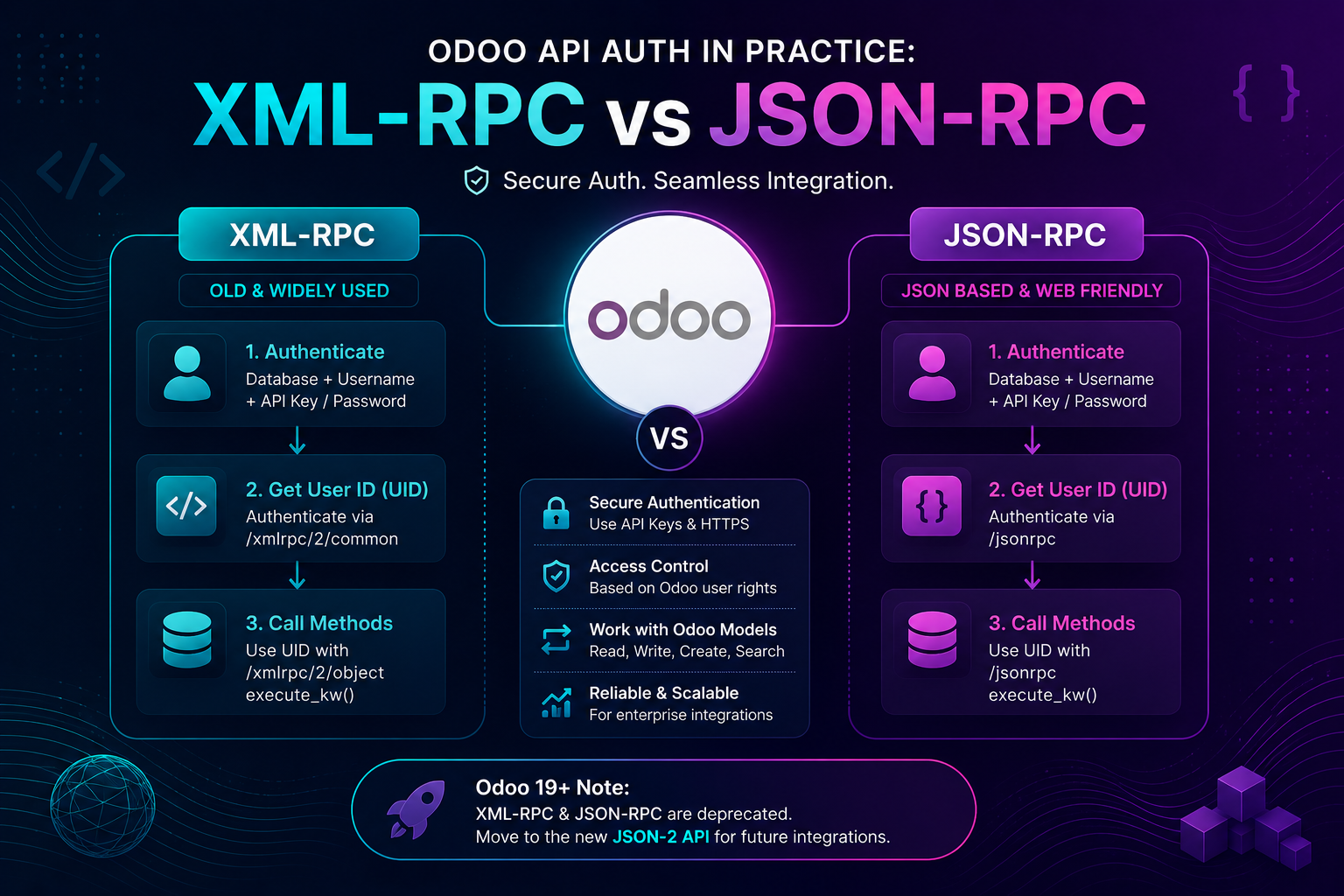
Connecting an external application to Odoo usually starts with one question:
How should the application authenticate and communicate with Odoo?
For years, two common answers have been XML-RPC and JSON-RPC.
Both can connect external applications with Odoo models, but they differ in payload format, client implementation, and developer experience.
There is also an important change for modern Odoo projects: Odoo 19 deprecates the legacy external XML-RPC and JSON-RPC endpoints in favor of the newer JSON-2 API.
So if you're working with Odoo XMLRPC JSONRPC integrations today, understanding both the existing authentication flow and the migration direction matters.
The Basic Odoo API Flow
A traditional external Odoo integration usually follows this pattern:
External Application
        │
        ▼
 Authentication
        │
        ▼
      User ID
        │
        ▼
 Odoo Object Service
        │
        ▼
     Odoo Model
        │
        ▼
      Records
Typical connection information includes:
Odoo URL
Database
Username
Password / API Key
Once authenticated, the integration can interact with models such as:
res.partner
sale.order
product.product
account.move
stock.picking
The user's normal Odoo access rights and record rules still determine what the integration can access.
For larger integrations involving CRM, eCommerce, payments, logistics, or other enterprise systems, a structured Odoo integration approach is important because authentication is only one part of reliable data synchronization.
XML-RPC Authentication
XML-RPC is one of Odoo's long-standing external API mechanisms.
In Python, the standard library already provides an XML-RPC client.
import xmlrpc.client

url = "https://example.odoo.com"
db = "example"
username = "integration@example.com"
api_key = "YOUR_API_KEY"

common = xmlrpc.client.ServerProxy(
    f"{url}/xmlrpc/2/common"
)

uid = common.authenticate(
    db,
    username,
    api_key,
    {}
)

print(uid)
If authentication succeeds, Odoo returns a user ID:
7
That uid is then used for model operations.
Calling an Odoo Model With XML-RPC
Create another proxy:
models = xmlrpc.client.ServerProxy(
    f"{url}/xmlrpc/2/object"
)
Now we can query contacts:
partners = models.execute_kw(
    db,
    uid,
    api_key,
    "res.partner",
    "search_read",
    [[["is_company", "=", True]]],
    {
        "fields": ["name", "email"],
        "limit": 5
    }
)

print(partners)
Conceptually, the call is:
Application
     │
     ▼
/xmlrpc/2/object
     │
     ▼
execute_kw()
     │
     ▼
res.partner.search_read()
The approach is straightforward, particularly for Python scripts and existing integrations.
What About API Keys?
For integrations, avoid hardcoding a user's main password whenever possible.
Odoo supports API keys that can replace the password in traditional RPC calls.
So instead of:
password = "user-password"
you can use:
api_key = os.environ["ODOO_API_KEY"]
and authenticate with that credential.
Keep it outside your source code:
export ODOO_API_KEY="..."
Treat the API key like a password.
Anyone who obtains it may receive the permissions associated with that Odoo user.
JSON-RPC Authentication
JSON-RPC uses JSON rather than XML to represent requests and responses.
A typical request structure looks conceptually like this:
{
  "jsonrpc": "2.0",
  "method": "call",
  "params": {
    "...": "..."
  },
  "id": 1
}
Because JSON maps naturally to JavaScript objects, JSON-RPC has historically been convenient for web-oriented integrations.
A request can be made using a normal HTTP client:
import requests

payload = {
    "jsonrpc": "2.0",
    "method": "call",
    "params": {
        "service": "common",
        "method": "authenticate",
        "args": [
            db,
            username,
            api_key,
            {}
        ]
    },
    "id": 1
}

response = requests.post(
    f"{url}/jsonrpc",
    json=payload
)

uid = response.json()["result"]
The authentication concept remains similar:
Database
   +
Username
   +
Credential
   ↓
Authenticate
   ↓
User ID
The major difference is how the RPC request is encoded and transported.
XML-RPC vs JSON-RPC
Here's the practical comparison:
| Area | XML-RPC | JSON-RPC |
|---|---|---|
| Encoding | XML | JSON |
| Payload | More verbose | Generally lighter |
| Python support | Excellent | Excellent |
| JavaScript friendliness | Moderate | High |
| Human readability | Lower | Higher |
| Legacy Odoo integrations | Very common | Common |
| Odoo 19 external RPC status | Deprecated | Deprecated |
| Long-term direction | JSON-2 | JSON-2 |
If you're maintaining an older Python integration, XML-RPC can still be perfectly understandable and functional for supported versions.
For a new long-lived integration, however, protocol choice shouldn't be made without considering Odoo's deprecation roadmap.
The Important Odoo 19 Change
This is where older Odoo API tutorials can become misleading.
Starting with Odoo 19, the external endpoints:
/xmlrpc
/xmlrpc/2
/jsonrpc
are deprecated.
Odoo's replacement is the External JSON-2 API.
The newer architecture looks more like:
POST /json/2/<model>/<method>
with an API key supplied through the authorization header.
For example:
import requests

response = requests.post(
    f"{url}/json/2/res.partner/search_read",
    headers={
        "Authorization": f"bearer {api_key}"
    },
    json={
        "domain": [
            ["is_company", "=", True]
        ],
        "fields": [
            "name",
            "email"
        ],
        "limit": 5
    }
)

partners = response.json()
Notice what's missing:
username
password
uid
execute_kw
Authentication becomes API-key based.
The request itself identifies the model and method:
/json/2/res.partner/search_read
        │
        ├── Model  → res.partner
        │
        └── Method → search_read
This produces a cleaner HTTP integration model.
Authentication: Old RPC vs JSON-2
The difference is easier to see side by side.
XML-RPC / Legacy JSON-RPC
Database
   +
Username
   +
Password/API Key
       │
       ▼
  authenticate()
       │
       ▼
      UID
       │
       ▼
   execute_kw()
JSON-2
API Key
   │
   ▼
Authorization: bearer <key>
   │
   ▼
/json/2/model/method
   │
   ▼
Odoo
For new Odoo 19+ integrations, this newer model deserves serious consideration.
Use a Dedicated Integration User
Whichever API style you use, don't automatically connect integrations through an administrator account.
Create a dedicated user such as:
erp-integration-bot
and grant only the permissions required by the integration.
For example, an application that synchronizes customers may need:
Contacts → Read
Sales → Read
but probably doesn't need:
Settings → Administration
Accounting → Full Access
Users → Manage
This follows the principle of least privilege.
If an integration credential is compromised, the account's permissions determine the potential impact.
Keep Authentication Configuration Outside Code
Avoid this:
username = "admin@example.com"
api_key = "abcd1234..."
Prefer environment variables or a secrets manager:
import os

url = os.environ["ODOO_URL"]
db = os.environ["ODOO_DB"]
username = os.environ["ODOO_USER"]
api_key = os.environ["ODOO_API_KEY"]
Your repository then contains integration logic—not production credentials.
For custom modules and workflows that require API hooks or external data exchange, custom Odoo development can also separate integration logic from core ERP functionality and make future upgrades easier to manage.
Handle Authentication Failures Clearly
Don't assume authentication always succeeds.
For XML-RPC:
uid = common.authenticate(
    db,
    username,
    api_key,
    {}
)

if not uid:
    raise RuntimeError(
        "Odoo authentication failed"
    )
For HTTP-based APIs, also check:
HTTP status
Timeouts
Invalid JSON
Expired credentials
Access errors
A production integration should distinguish between:
Authentication failure
Authorization failure
Network failure
Odoo server failure
Invalid request
They require different fixes.
Which Should You Use?
The answer depends largely on the Odoo version and whether you're maintaining or creating the integration.
Existing XML-RPC integration
If it's stable and running against a supported Odoo version, you don't necessarily need an immediate rewrite.
But plan for migration.
Existing JSON-RPC integration
The same principle applies.
Keep it operational while preparing for JSON-2.
New Odoo 19+ integration
Prefer evaluating JSON-2 first.
Building a brand-new integration around an already deprecated API creates avoidable future migration work.
Older Odoo environment
XML-RPC may remain the simplest option, especially for Python automation.
Compatibility with your actual Odoo version matters more than following the newest API blindly.
A Practical Decision Guide
What are you building?
        │
        ▼
Existing integration?
   │           │
  YES          NO
   │           │
   ▼           ▼
XML/JSON RPC   Odoo 19+?
still works?    │
   │         ┌─┴─┐
  YES       YES  NO
   │         │    │
   ▼         ▼    ▼
Maintain   JSON-2  Check version
+
Plan migration
The key is not simply choosing XML or JSON.
It's choosing an API strategy that matches the lifecycle of your Odoo installation.
Security Checklist
Before shipping an Odoo API integration:
Use HTTPS.
Prefer API keys over embedding user passwords.
Store credentials outside source code.
Use a dedicated integration account.
Apply minimum required permissions.
Rotate and revoke credentials when appropriate.
Handle authentication errors explicitly.
Log failures without logging secrets.
Test record rules and access permissions.
Plan migration away from deprecated APIs.
Authentication is only secure when the entire integration respects the same trust boundary.
Final Takeaway
The Odoo XMLRPC JSONRPC comparison is no longer simply about XML versus JSON.
For existing Odoo integrations:
XML-RPC → Mature and widely used
JSON-RPC → JSON-based alternative
But for modern Odoo development:
XML-RPC
     \
      → Deprecated → JSON-2
     /
JSON-RPC
If you're maintaining an older integration, understand its authentication flow, protect API credentials, and keep permissions narrow.
If you're starting a new integration on Odoo 19 or later, evaluate JSON-2 before committing to either legacy RPC interface.
That small architecture decision today can save a much larger migration later.